

Installing certificates for macOS
Install the root certificates
Download the root certificates from the link Russian Trusted Root CA → go to the Downloads folder → extract the certificates from the archive → select RussianTrustedCA.pem → in the Keychain application, enter your username and password → click “Change Keychain”

2. In the Keychain application, select “Login” → go to the “Certificates” tab — it will display the newly installed certificates.
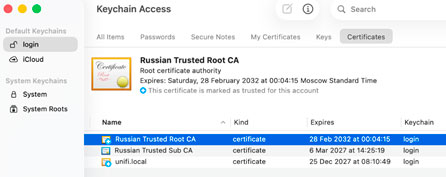
3. Select the Russian Trusted Root CA certificate → expand the “Trust” tab → click “Always trust”

4. Enter your username and password → click “Update settings”
5.In the Keychain application, select Russian Trusted Sub CA → expand the “Trust” tab → select “Always trust” → enter your username and password → click “Update Settings”
6.Trust must be provided for all root and intermediate certificates. Use the examples for Russian Trusted Root CA and Russian Trusted Sub CA
7. Clear the browser cache on the device you are accessing from. This is necessary to work correctly with resources protected by certificates.
8. Download the TCI root certificate → Click “save” → click “open in service” →click “open Downloads folder” → click on the “ECDSA-a1.crt” certificate. Next, to install this certificate, repeat the steps specified in paragraphs
Download the intermediate TCI certificate → click “save” → click “open in service” →click “open Downloads folder” → click on the certificate “ECDSA-16-280.cer”. Next, to install this certificate, repeat the steps specified in paragraphs